Leftover code remains after uninstalling Transtore
When you uninstall Transtore, the Switcher is automatically removed and Transtore stops running on your storefront. In most cases, you do not need to remove any code manually.
If you previously set up the Currency feature, however, its currency formatting may remain in your Shopify settings after uninstalling. Remove it to restore Shopify’s default currency formatting.
Remove Transtore’s currency formatting
- In your Shopify admin, go to Settings > General.
- Scroll to Store defaults.
- Click the three-dot menu next to Currency display.
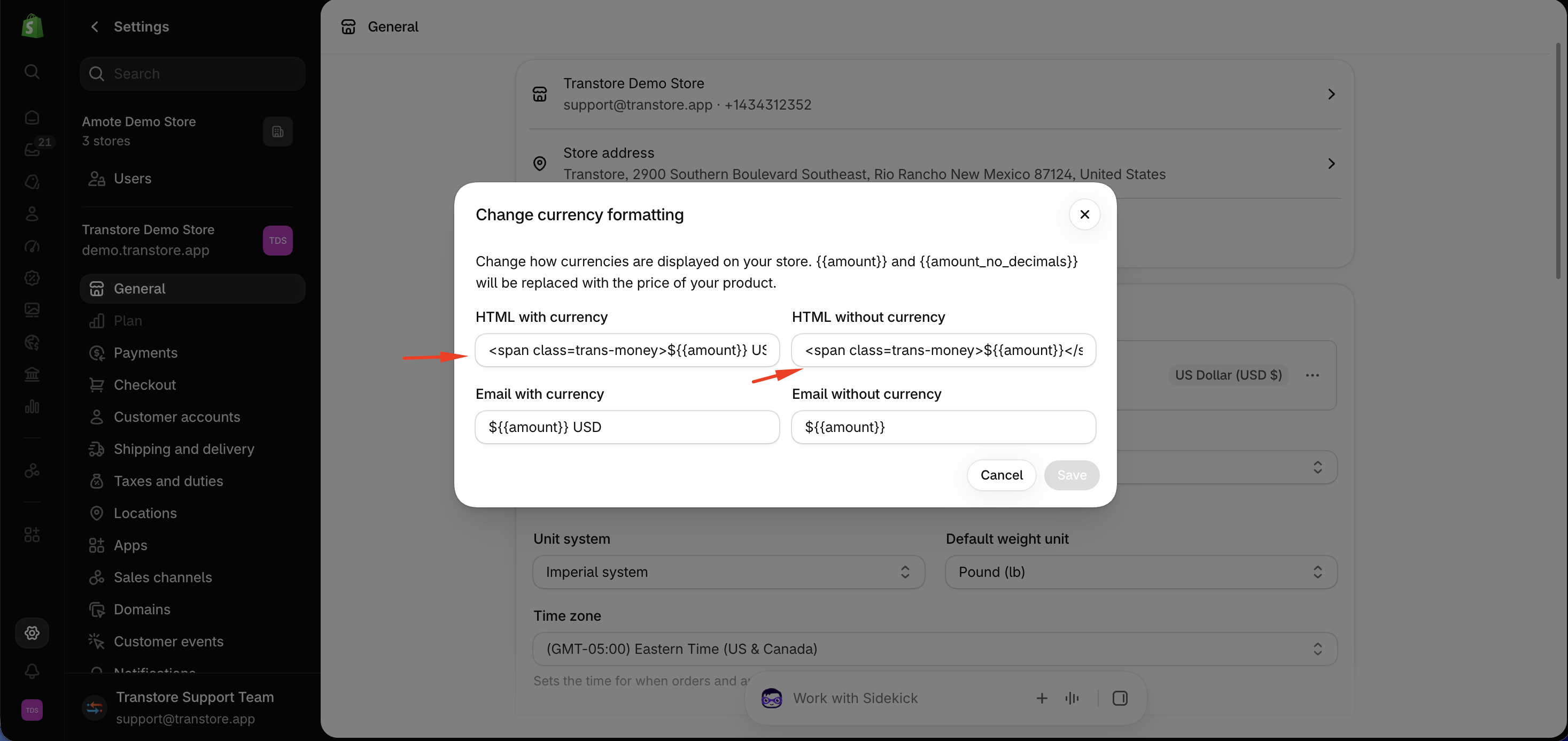
- Select Change currency formatting.
- Remove the Transtore formatting code from both fields:
- HTML with currency
- HTML without currency
- Click Save.
Your store will then use Shopify’s default currency formatting.
When do I need to do this?
Complete these steps only if you previously configured the Currency feature in Transtore.
If you still see Transtore elements on your storefront after uninstalling the app, contact us at [email protected] and include your storefront URL. We’ll check it for you.