How to Grant Collaborator Access
In some cases, our support team may need temporary access to your Shopify admin to investigate issues, review configurations, or assist with setup and troubleshooting.
Shopify's Collaborator account feature allows you to securely grant access without sharing your login credentials. You remain in full control and can review or remove access at any time.
Why do we need Collaborator access?
Granting Collaborator access allows our team to:
- Investigate app-related issues directly in your store
- Review your Shopify and app configurations
- Verify settings that may affect app functionality
- Troubleshoot theme, language, currency, or integration issues
- Help configure features when requested
We only request the permissions necessary to diagnose and resolve your issue.
Before you start
To send a collaborator request, we need:
- Your Shopify store domain (for example:
your-store.myshopify.com) or Shopify store URL - Your Shopify Collaborator code
Once we receive these details, we'll send a collaborator request to your store.
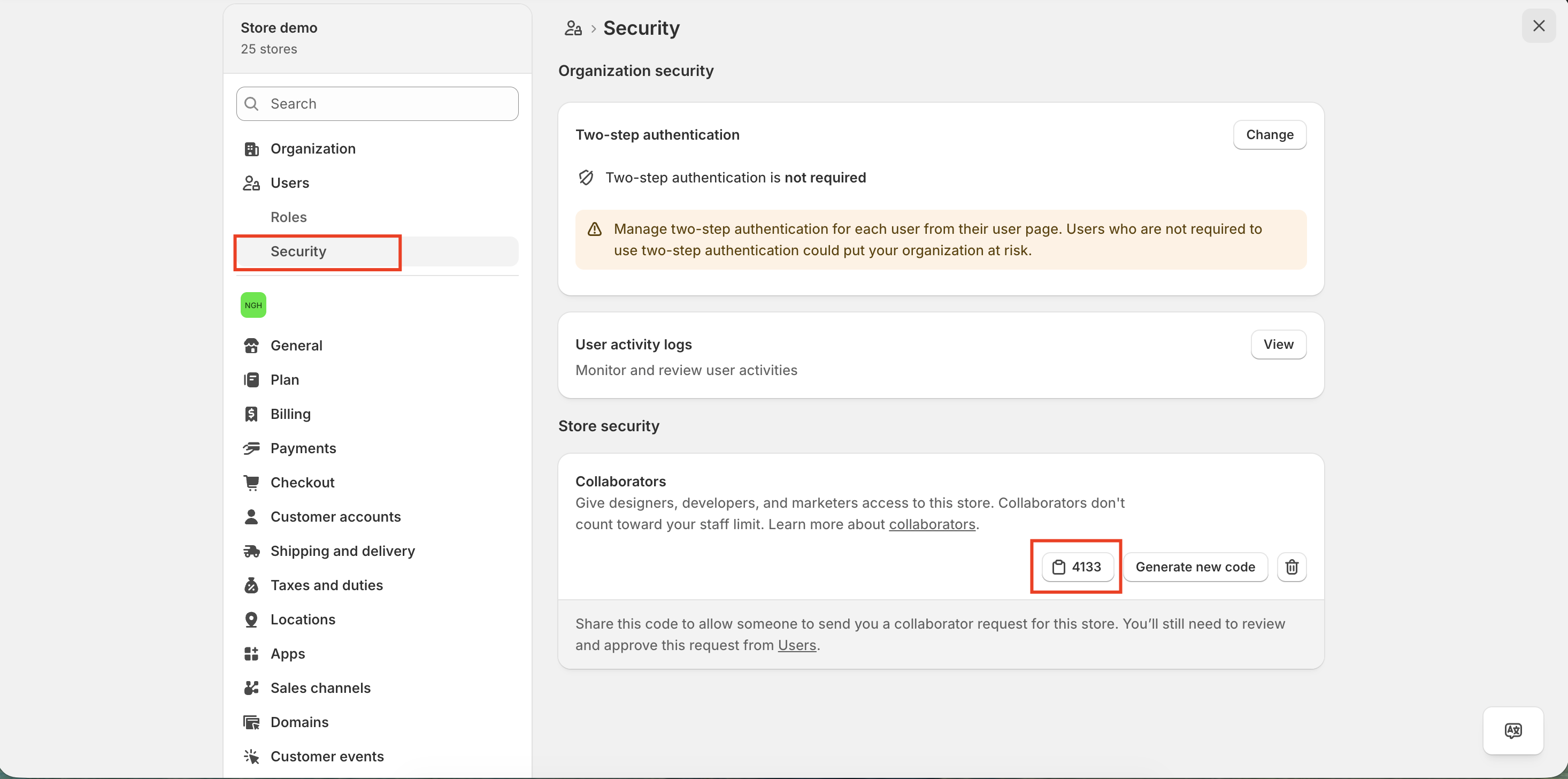
Step 1: Find your Collaborator code
- From your Shopify admin, go to Settings > Users.
- Do one of the following:
- If your store is part of an organization, click Users.
- If your store is not part of an organization, click Users & permissions.
- Click Security.
- In the Collaborators section, locate your 4-digit Collaborator code.
- Copy the code and share it with our support team.
Step 2: Wait for our collaborator request
After receiving your store domain and Collaborator code, our team will submit a collaborator access request to your Shopify store. Shopify will notify you when the request is available for review.
Step 3: Approve the collaborator request
- From your Shopify admin, go to Settings > Users.
- Locate the pending collaborator request.
- Open the request and review the permissions being requested.
- Click Accept request to grant access.
Notes
- Collaborator accounts do not count toward your Shopify staff account limit.
- You never need to share your Shopify password with our team.
- Access is granted only after you approve the collaborator request.
- You can revoke access at any time from your Shopify admin.
If you're unable to locate your Collaborator code or approve the request, please don't hesitate to reach out to us at [email protected].